DaisyDisk 4.34 Adds APFS Clone Support: What Students Should Know
Published: Wednesday 1st July 2026
DaisyDisk 4.34, released on 1 July 2026, makes the popular Mac disk space analyser more accurate on modern Macs by adding support for APFS clones. It is a focused update rather than a redesign, but it fixes a real source of confusion: folders that appear to take up far more space than they actually do. Together with the 4.33 update in January 2026, which refreshed the app for macOS Tahoe and improved hidden space estimates, it makes DaisyDisk more trustworthy for anyone trying to work out where their storage has gone.
What's new in DaisyDisk 4.34
APFS clone detection
APFS, the file system used by every current Mac, supports clones. When you duplicate a file on the same volume, macOS can create a copy that shares the original's data on disk instead of writing it out again. Until one of the copies is changed, the duplicate takes up almost no extra space. Many disk tools do not know this and count every clone at full size, so a folder full of duplicated files can look enormous.
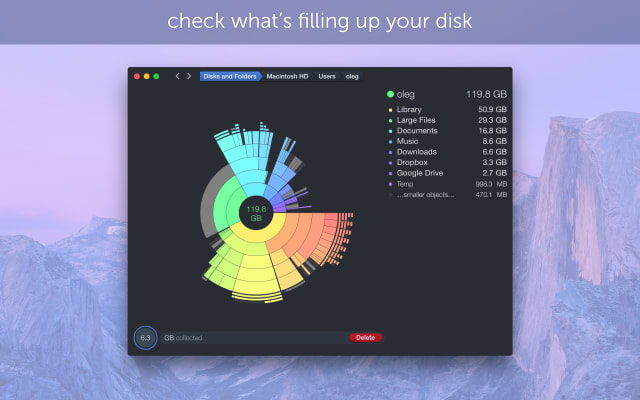
DaisyDisk 4.34 now detects clones and allows for them when it calculates used space. According to the developer's release notes, it works the same way DaisyDisk already treats hard links: the first occurrence of a cloned file is counted, and the other copies are given a virtual size of zero bytes so they do not inflate folder totals. In practice, the sizes you see in DaisyDisk's sunburst map should line up more closely with the space you would actually free by deleting something.
Follow-up fixes
Two small updates followed. Version 4.34.1 (4 July 2026) fixed a scanning problem on Macs running versions of macOS older than Sonoma, and 4.34.2 (10 July 2026) fixed a further bug.
Earlier in 2025 and 2026
DaisyDisk had several other updates during this period:
- Version 4.33 (3 January 2026): new dark and Liquid Glass icons to match macOS Tahoe, better Tahoe support, more accurate estimates of hidden space, a fix for wrong size estimates on FAT32 and exFAT drives, and more social networks to share results to. Hot fixes 4.33.1 and 4.33.2 followed within a week.
- Version 4.32 (26 September 2025): fixed compatibility issues with macOS 26 Tahoe.
- Version 4.31 (10 January 2025): added support for APFS dataless files.
Put together, these releases are mostly about keeping DaisyDisk's numbers accurate as Apple's file system and macOS itself change.
Why it matters for students
- Getting the most out of a base-storage MacBook: many student laptops ship with 256GB or 512GB of storage, and it fills up quickly. DaisyDisk shows exactly which folders are responsible, and clone support means you are less likely to chase folders that only look large.
- Creative and media courses: film, photography, music and design students often duplicate project folders before making changes. On APFS those duplicates may be clones, and DaisyDisk now reports them realistically, so you can decide which versions really need clearing out.
- Coding and data science: development tools, virtual machines, Docker images, package caches and old Xcode simulators can quietly take up tens of gigabytes. A visual scan makes it easy to find and remove what you no longer need, and to check the hidden space that macOS keeps for itself.
- Before a big deadline or macOS upgrade: a quick scan helps you free enough space for a large software install, a macOS update or exporting a final project, without deleting coursework by mistake. DaisyDisk lets you review everything before anything is deleted.
- External and USB drives: the FAT32 and exFAT fix in 4.33 helps if you use memory sticks or shared drives formatted for both Mac and Windows, which is common in university labs.
Requirements and upgrade details
- DaisyDisk's website lists macOS 10.13 High Sierra or newer, on both Apple silicon and Intel Macs.
- It is a one-off purchase rather than a subscription, and a licence covers up to five personal Macs.
- Version 4.34 is a free update for existing DaisyDisk 4 owners, as the developer includes minor updates and bug fixes with the licence.
- DaisyDisk is available directly from the developer and from the Mac App Store, and there is a free trial version to download.
Get DaisyDisk with a student discount
Student App Centre members get 50% off DaisyDisk. Visit our DaisyDisk student discount page to claim it. New to Student App Centre? You can try membership free for 7 days.