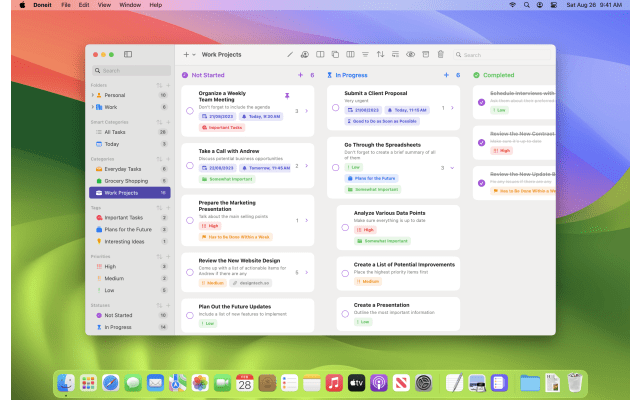
Doneit 3.0: Liquid Glass Redesign and Doneit Assist for Students
Published: Monday 15th September 2025
DesignTech released Doneit 3.0 on 15 September 2025, a major update to its kanban-style task manager for iPhone, iPad, Mac and Apple Watch. Version 3.0 redesigned the app for Apple's Liquid Glass look and introduced Doneit Assist, a planning feature that creates tasks and subtasks for you. Two further feature releases followed in August and September 2026. If you juggle modules, group projects and deadlines across several devices, these updates make Doneit more capable for planning a term.
What's new in Doneit 3.0
A Liquid Glass redesign
The app and its icon were redesigned around Liquid Glass, the visual style Apple introduced with its 2025 operating systems, so Doneit matches the rest of the system on each device. DesignTech also improved the timeline view, which lays tasks out across dates, and added better support for working in multiple windows on iPad.
Doneit Assist
The headline addition is Doneit Assist, which can generate tasks and subtasks from what you ask it to plan. Rather than typing out every step of a project by hand, you describe the goal and let the app draft a list that you can then edit.
Live Activities, shortcuts and controls
- Live Activities show the progress of a task list on the Lock Screen, so you can see how far through a list you are without opening the app.
- App shortcuts gained a snippet that previews some tasks when you use the Tasks in List shortcut.
- Controls are now supported on the latest version of watchOS.
The full notes for each version are in the Doneit version history on the App Store.
Since then
Doneit 3.1 (17 August 2026) was billed as a back-to-school update. Subtasks can now be nested up to five levels deep, which is a Premium feature, and you can convert tasks into subtasks and back again. It also added a Shift-Command-L shortcut to jump to the selected task list and made iCloud sync faster and more reliable.
Doneit 3.2 (14 September 2026) expanded Doneit Assist considerably:
- On the latest iOS and iPadOS, you can attach a photo when planning, so a handwritten list, a whiteboard or a document can be turned into tasks.
- Assist can add extra detail to tasks, suggest reminders and attributes, and break tasks into subtasks.
- It can summarise a task list, highlight the key tasks and show what is coming up next.
- Tasks can be added with the new Siri, which can also see the lists and tasks on screen.
- The List widget supports the new extra-large portrait size on iOS, and you can now delete the sample data added during onboarding.
Why it matters for students
- Breaking down assignments: a dissertation or lab report is easier to start when it's split into steps. Doneit Assist can draft that breakdown, and nested subtasks let you go from chapter to section to individual task without losing the structure.
- Capturing what's on the board: after a seminar or supervision meeting, a photo of the whiteboard or your handwritten notes can become a task list with the 3.2 photo feature on iPhone or iPad.
- Group projects: kanban boards suit shared work with clear stages, such as research, drafting, editing and submitted. The timeline view helps you see how the pieces line up against a hand-in date.
- Revision planning: keep one list per module and use Live Activities to track how much of a revision checklist is left while you work through it.
- Across devices: plan on your Mac in the library, then tick things off on your iPhone between lectures, with iCloud sync keeping everything aligned.
Requirements and upgrade details
- The current version of Doneit requires iOS 26, iPadOS 26 or macOS 26 or later, with a watchOS 26 requirement for Apple Watch.
- Doneit is a free download, and the 3.x updates are delivered through the App Store as normal updates.
- Doneit Premium is available as a monthly or yearly subscription, or as a one-off lifetime purchase. Nested subtasks require Premium.
Get Doneit with a student discount
Student App Centre members get 60% Off Doneit, which makes Premium features such as nested subtasks much cheaper to unlock. Visit the Doneit student discount page to see how to claim it. New to Student App Centre? You can try membership free for 7 days first.