Little Snitch 6.4: What's New for Students
Published: Sunday 21st June 2026
Objective Development released Little Snitch 6.4 on 21 June 2026, the largest feature update to its Mac network monitor and firewall in well over a year. It brings tidier menus on macOS Tahoe, a more flexible way to lock and unlock your configuration, quicker rule management across profiles and updated encrypted DNS options. A follow-up, Little Snitch 6.5, arrived on 8 September 2026 with support for macOS 27. If you care about which apps on your Mac talk to the internet, and when, both releases are worth knowing about.
What's new in Little Snitch 6.4
Better menus on macOS Tahoe
Menus throughout the app now show icons on macOS 26 Tahoe, including the main menu, the context menus in the rules list and sidebar, and the connection list in Network Monitor. Objective Development has made these icons slightly larger than the Tahoe default so they are easier to read. If you prefer plain text menus, the release notes explain how to switch them off with a Terminal command.
More flexible configuration locking
Little Snitch can lock its configuration so that rules cannot be changed by accident or by someone else using your Mac. Version 6.4 makes that lock much less of a chore:
- Unlock until quit: you can temporarily unlock a locked configuration from the menu bar for the current session, without removing the lock altogether.
- Change locked settings with authentication: individual locked settings in the Control Center can now be changed with Touch ID or your password, rather than unlocking everything first.
- Keyboard shortcut: Lock Configuration can now be triggered with Command-L.
Faster rule management
Holding Option while dragging rules to another profile now copies them instead of moving them, which is handy if you keep separate profiles for different networks. Blocklists and remote rule groups can now refresh every hour as well as daily. When you add a rule, the window jumps to the group or profile it was added to, and performance when filtering and sorting large blocklists has been improved.
Security and encrypted DNS
Little Snitch now checks the integrity of its own app bundle while it is running, not only at launch, and warns you if its components have been unexpectedly modified. The software updater supports Touch ID. The dns0.eu encrypted DNS preset has been replaced with DNS4EU, because dns0.eu has shut down, and the Quad9 preset now uses Quad9's unfiltered endpoints.
Network Monitor refinements
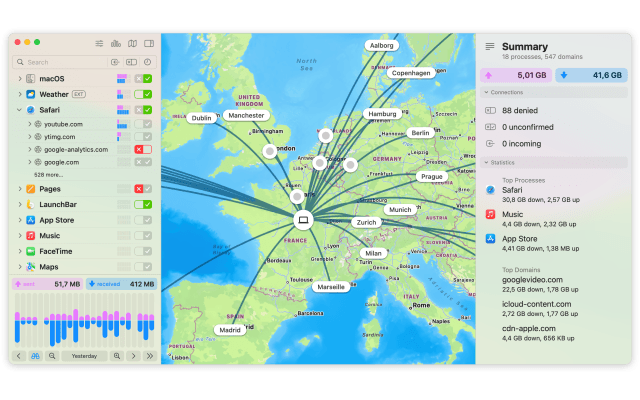
Clicking a location that is already selected on the map now clears the location filter. Connection details in the inspector now show the main executable and any helper process as separate entries, and connections to 0.0.0.0 are no longer listed. The release also fixes a problem where some connections showed only an IP address instead of a hostname.
Since then: Little Snitch 6.5
Little Snitch 6.5, released on 8 September 2026, adds compatibility with macOS 27 Golden Gate. Objective Development's release notes stress that you should install it before upgrading to macOS 27, because earlier versions are not compatible and would break your internet connection after the upgrade. It also adds experimental NAT64 support and improvements to encrypted DNS. A small 6.4.1 hot fix in June resolved an issue where some older licences were not recognised.
Why it matters for students
- Working on public and university Wi-Fi: Little Snitch shows every outgoing connection, so you can see which apps phone home while you are on campus, library or café networks, and block the ones you do not trust. Separate profiles for home and campus networks are now easier to maintain thanks to rule copying.
- Protecting research and coursework data: if you handle interview recordings, survey responses or other sensitive material for a dissertation, you can stop apps from sending data you did not expect them to send.
- Learning networking and security: for computer science and cyber security students, Network Monitor is a practical way to see DNS, hostnames and traffic volumes for real apps. Encrypted DNS options such as DNS4EU and Quad9 give you something concrete to experiment with.
- Keeping a shared Mac under control: the configuration lock, now easier to use with Touch ID, stops housemates or family members from quietly changing your rules.
- Cutting background data use: when you are tethering to your phone, blocking auto-updaters and sync tools you do not need can save mobile data.
Requirements and upgrade details
- According to Objective Development's download page, Little Snitch 6.5 runs on macOS 27 Golden Gate and is also compatible with macOS Tahoe, Sequoia and Sonoma.
- Versions 6.4 and 6.5 are updates within Little Snitch 6 and are delivered through the app's built-in software update.
- Objective Development says licences bought after 1 January 2024 can already be used with Little Snitch 6. Owners of Little Snitch 5 licences bought before that date can upgrade at a reduced price.
- Without a licence, Little Snitch runs in a demo mode that offers full protection for three-hour sessions, which you can restart as often as you like.
Get Little Snitch with a student discount
Student App Centre members get 30% off Little Snitch. Head to our Little Snitch student discount page to claim it. If you're not a member yet, you can start with a 7-day free trial of Student App Centre membership.